> For the complete documentation index, see [llms.txt](https://info.sabaiprotocol.com/llms.txt). Markdown versions of documentation pages are available by appending `.md` to page URLs; this page is available as [Markdown](https://info.sabaiprotocol.com/how-to-invest-in-real-estate-with-sabai-property/step-1-registration-and-verification.md).
# 1️⃣ Step 1: Registration and Verification
To begin investing with Sabai Property, your first step is to register on the platform and complete ID verification. It's quick and easy, taking just a few minutes of your time!
* [Registration](#registration)
* [ID verification procedure](#id-verification-procedure)
***
### Registration
Please go to the [**registration page**](https://id.sabaiecoverse.com/sign-up) and sign up using your email or Google account by clicking on "Continue with Google".
Then enter the confirmation code from the email sent to the specified email address and click **"Confirm"**.
**Congratulations, you're registered!** Now you'll need to undergo [**identity verification**](https://id.sabaiecoverse.com/kyc).
***
### ID verification procedure
To pass ID verification, go to the [**ID verification section**](https://id.sabaiecoverse.com/kyc) in Sabai ID. Then click on **"Click here for Verification."**
Review the verification terms and click on **"Start Verification."** Select the country whose documents you will present for ID verification.
Then click on the button corresponding to the provided document.
The process of undergoing ID verification
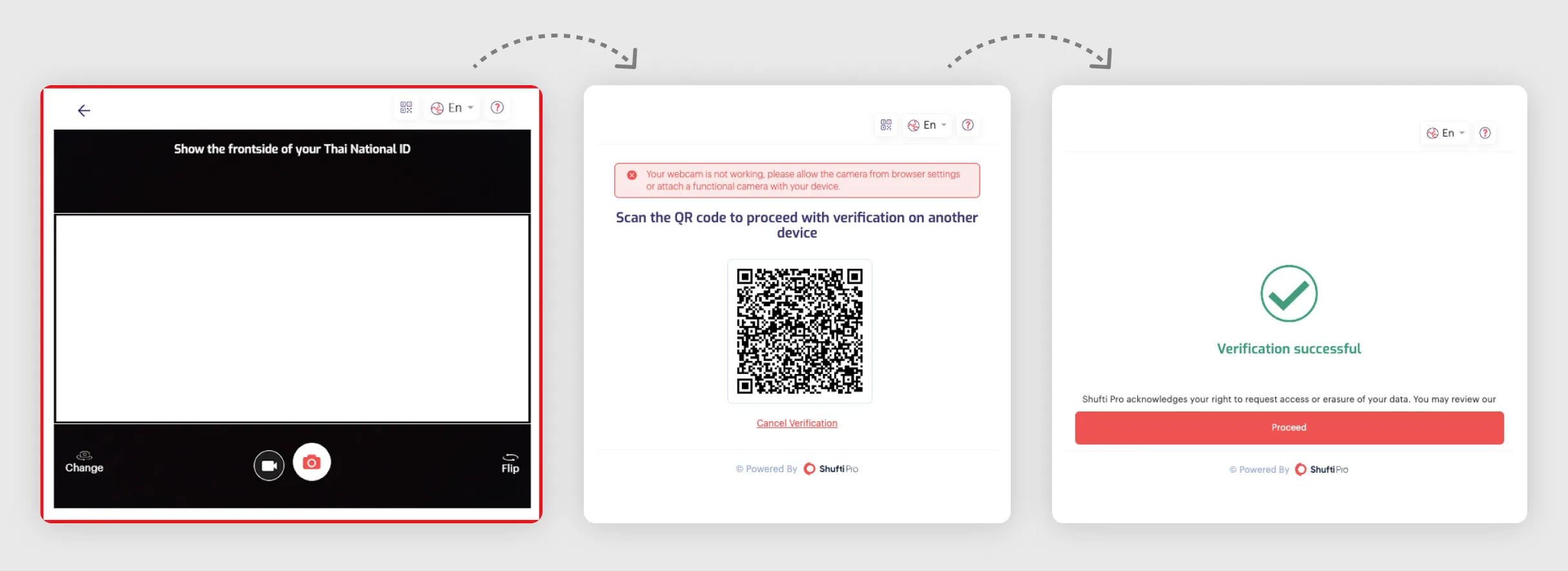
**After that, take a photo of the document** through the opened interface by pressing the corresponding button, and then take a selfie.
If the camera on your device is not working, you will be provided with a **QR code to scan** on a device with a working camera, such as your smartphone.
After completing all the steps, **the document will be automatically verified** and identified. This usually takes about a minute.
The process of undergoing ID verification.
**Congratulations! You have successfully passed the identity verification** and are now one step closer to investing with Sabai Property!